
It’s ideal for Android users who want to stay on top of Google Play services, quickly access update and troubleshooting options, and have all these controls in one app.
A focused dashboard for Google Play services
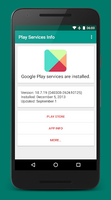
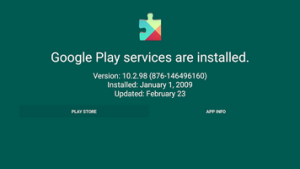
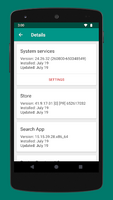
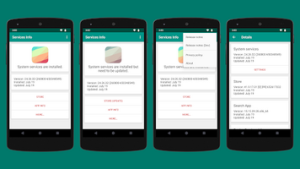
Essentially, Play Services Info functions as a status dashboard for important Google system services. The main view displays the current version number of Google Play services, along with the installation date and the date of the last update.
This allows you to easily see at a glance whether the core services are up to date or if they might be outdated.
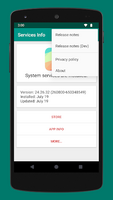
A more detailed view expands on this idea to additional components, showing the status of other key services such as the Google Play Store, the Search app, and various AI/VR services.
By combining these entries, you gain a clearer understanding of how Google’s underlying layer is configured on your device.
The app is described as small and focused on information rather than superfluous elements, which aligns with its function as a system tool rather than a general-purpose application.
Shortcuts for updates and maintenance
Beyond static information, Play Services Info gives you direct access to the tools already on your device. From its interface, you can access:
– Release notes, to see the changes between versions.
– The official Google Play listing in the App Store, if you need to update to the latest version.
– The Android app info screen, where you’ll find system options like cache control and installed updates.
The developer highlights two common problems: outdated services and messages about service stopping. Play Services Info doesn’t replace Android’s controls, but it helps you quickly access the screens needed to resolve these issues.
One user also points out that the app provides tools to check for the latest updates and manage data and storage usage for Google Play apps.
For those who regularly check how much space or data Google’s background services use, having these options accessible from a single place is a huge advantage
.Taken together, these shortcuts help keep the underlying services that support many apps and games running smoothly, supporting the developer’s goal of letting you “play and use your apps without errors.”
Interface: efficient, but sometimes crowded
Play Services Info aims for an intuitive interface, and some users prefer it to similar tools pre-installed by device manufacturers.
Information about versions, dates, and links is logically organized, so you don’t have to navigate through multiple menus in Android settings to find what you need.
That said, not everyone will appreciate the presentation. One user describes the interface as visually cluttered, with a lot of information on each screen.
The content is quite dense, and the emphasis is clearly on functionality rather than visual minimalism. If you prefer clean, minimalist screens, the amount of text and options on a single page might be a bit overwhelming.One small but practical detail mentioned by a user is the option to open Play Services Info directly from its page in the Google Play Store. This allows you to move more quickly from reading the app’s information to using its tools.
Stability and perceived performance
Regarding reliability, one user commented that they had no issues with the app or other apps on the device while using it.
This impression aligns with the tool’s limited, system-focused nature.
Another user reported that, after fully installing Play Services Info, the device felt more responsive, with improved action speed and higher-quality graphics across the system.
Experiences like these suggest that keeping Google Play services up-to-date and in good working order can influence device performance in daily use, even though the app primarily functions by displaying information and shortcuts rather than applying its own performance tweaks.As with any feedback of this kind, results may vary between devices, but it’s a positive sign that at least some users are noticing an improvement after incorporating it into their maintenance routine.
Who will appreciate it most
Play Services Info isn’t a general-purpose, all-in-one utility suite. It focuses on Google Play services and a small set of related system apps. This focus makes it particularly appealing to:
– Users who regularly monitor system components and want quick access to status information and updates.
– People who play a lot of games or rely on many Google-connected apps and want to reduce the likelihood of service-related errors.
– Privacy-conscious users who are selective about what they install and appreciate a clearer view of when and how Google’s core services have updated.
Because it’s compatible with most Android phones, tablets, TVs, and laptops, it adapts to various device configurations while maintaining the same familiar interface and functionality.
Verdict
Play Services Info is a simple, focused utility that gathers essential information about Google Play services and other key components.
Its strengths lie in its clarity and centralized access: version details, update dates, and direct links to store pages, release notes, and system settings are all presented in one compact package.
On the other hand, this specialization results in an interface that some users might find complex and a feature set focused on a specific part of Android, rather than covering general device maintenance.
If you’re looking for a simple way to check Google Play services, troubleshoot common problems more quickly, and monitor the data and storage used by Google Play apps, Play Services Info perfectly fulfills this purpose.


